Docs
History
Codiluce can index every commit of a branch as a snapshot of the architecture. The map then shows any commit, compares any two, and replays the branch as a time-lapse.
Index the history
# first-parent history of the checked-out branchnpx codiluce history index# or only part of itnpx codiluce history index --limit 200npx codiluce history index --since "6 months ago"# what is indexednpx codiluce history status
Options: --ref BRANCH, --limit N, --since DATE, --commits SHA,SHA, --jobs N (parallel processes, up to 6 by default), --all-parents and --pr-metadata github. Commits that already have a snapshot are skipped, so running it again only analyzes new commits. On a production app, 315 commits take about 3 minutes with 6 processes.
Commits are read from Git objects into scratch directories. Codiluce never checks out, never adds a worktree and never writes to your Git index. Start the map with --history-indexing to index single commits on demand from the timeline.
The timeline
Open History in the header. The timeline lists the commits of the branch over a sparkline of measured lines, and ends in your working tree. Solid ticks are indexed, diamonds are merges. Drag it, click it, or use [ and ] anywhere; Home and End jump to the ends.
- Snapshot shows the system exactly as it was indexed at that commit.
- Compare (the default) compares the commit with the one before it: added in green, removed as red ghosts where they used to be, modified in amber, moved in violet. Labels carry +, −, ~ and → as well, so color is never the only signal.
- Pin the baseline to compare any two commits.
The layout reserves a place for everything that ever existed, so stepping between commits never moves anything.
Split view
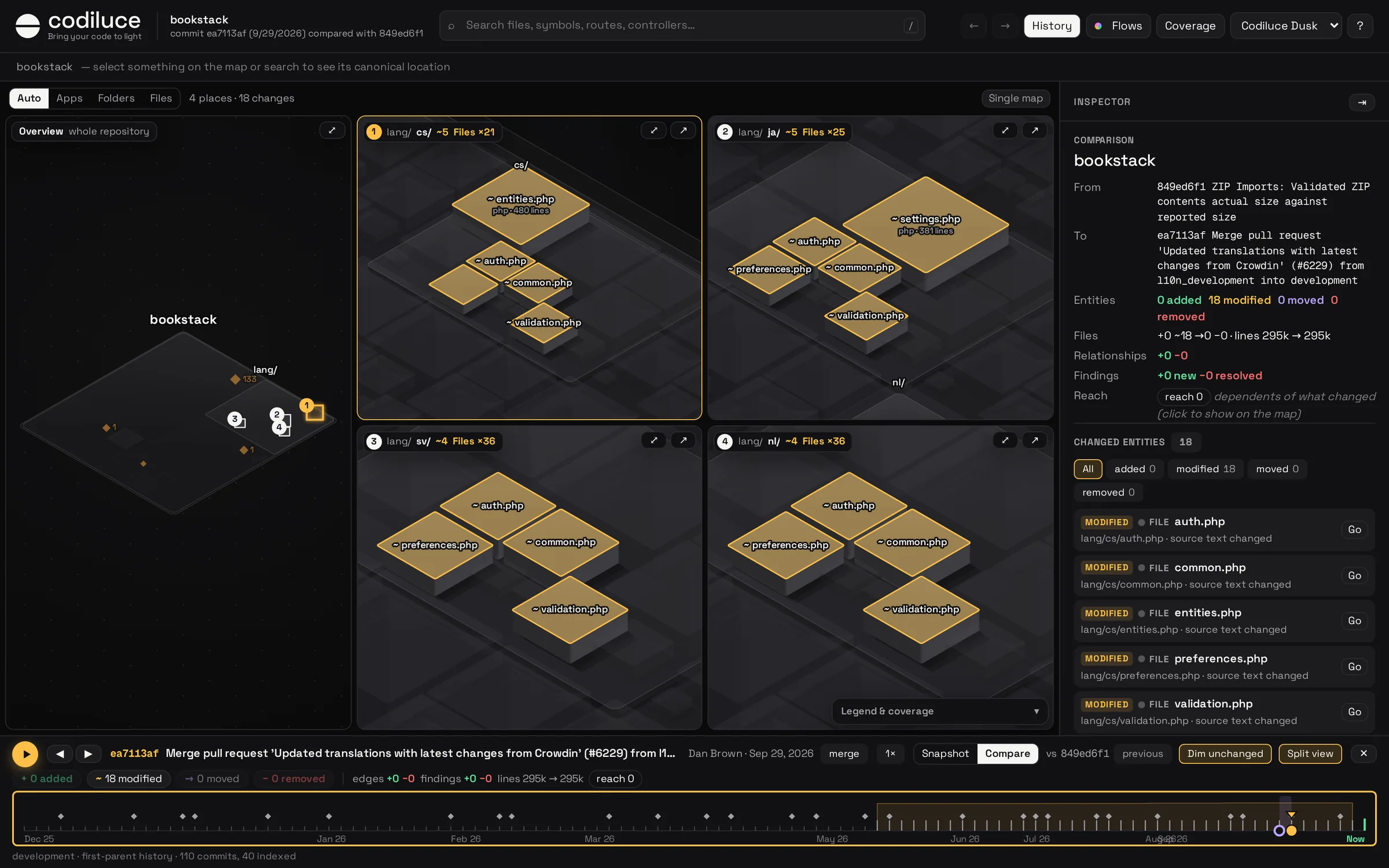
In Compare, the map splits into an overview of the whole repository and a view on each place where the code changed, five to a page. Each view frames its changed files; the overview draws each view’s frame, numbered. Places are grouped Auto, or one per app, folder or file. Every view is a full map: pan, zoom, select, or open it in the single map.
Time-lapse
Drag the timeline and every commit shows as you pass it. ▶ (or Space) plays the history at 0.5× to 4×: new areas rise into place, changed blocks flash in their status color, and with Follow the camera drifts toward the changes.
Diffs and entity history
For a selected entity, the inspector shows its architectural diff: what changed (source, signature, facts, size, name, place), its relationships and findings added or removed, with evidence. Source diff opens a unified or side-by-side diff of its own source. History of this entity lists every commit where it appeared, changed, moved or disappeared. Identities are followed across renames and moves.
Merge and squash messages give inferred pull request markers. --pr-metadata github records merged pull requests from the GitHub API as verified markers (set GITHUB_TOKEN for private repositories).